Mommy Octopus

We can all use a few more hands

  • Giveaways
  • Travel
  • Recipes
  • Disney World Tips
  • Homeschool
  • Law Enforcement Support
  • PR Inquiries
  • Contact Me
  • About Me

Search Results for: homeschool plans

Athens: The New World of Wonder Playground

January 3, 2017 By MommyOctopus Leave a Comment
By clicking my links, I may earn a small commission to support this blog. Please see our Disclosure Policy.

new-world-of-wonder-playground


As many of my local Athens, Georgia friends know, the new World of Wonder Playground, also know as the WOW Park, has reopened recently with an awesome new playscape.  We ventured out there today to celebrate our first day of the new semester in homeschooling.

Anyone that ever went to the old WOW park knew that you weren’t able to go in the summer during the day.  It was far too hot.  The new playground has plenty of shade with giant canopies over many playscapes and more importantly, over some of the benches for the parents.

Another big complaint was the forever hike to the bathrooms from the old playground.  The new playground is located right next to the bathrooms now, making it much easier to take a potty training toddler to go before an accident happens.  They also have water fountains inside the park fence but they weren’t working while we were there.

Source: https://www.athensclarkecounty.com/7124/World-of-Wonder

Source: https://www.athensclarkecounty.com/7124/World-of-Wonder

I can’t quite tell you about the benches, though, because I had a blast playing on the playground with my children!  They have a ginormous tube slide, a fun roller slide, and really all sorts of slides everywhere!

world-of-wonder-playground-generational-swing

The best part for me was the awesome Generation Swings that are located at the front of the park.  I could swing with my youngest!  He thought this was the best thing ever!

My 16 month old enjoyed the playscape designed for the 2-5 year old crowd.  On this one, there aren’t any stairs, so he was able to just walk right up the incline to get to his favorite slides.

My little monkeys enjoyed the many different types of monkey bars that were available.  Several look like things out of the American Ninja Warriors show.  My 10 year old son LOVED this part since he has great upper body strength and often needs a challenge.

athens-wow-park

One of the highlights for the kids was the intriguing merry-go-round type equipment.  It doesn’t spin as fast as the ones did when we were kids, but still super fun.  There is netting all around to keep kids from falling off as easy, too.  My kids loved climbing on it and then taking turns spinning everyone around.  Even my teenager had a blast!

All the equipment easily works for when a bunch of kids show up at once to play.  Everywhere we turned, there was something new and different to play with or on!

Another great feature is that there is walking path that parents can walk on that goes around the playground but is inside the fence!  You can get some exercise while your children play.  From what I am reading, it’s about 1/5 of a mile path, but I haven’t measured it for myself yet.  I definitely will be using this feature.  I saw one man walking/jogging the path and a few little kids riding their bikes or scooters on it as well.

We had a blast and will definitely be back!  This is a great place to visit!

Looking for more local ideas?  Visit my post:  Free Things To Do With Kids In Athens, Georgia!

Also check out Things to Do With Teens in Athens

For More Information:

Interested in taking an outing to this park?  The WOW playground is located at 325 Whit Davis Rd and is open Monday-Friday at 8:00 a.m.; Saturday-Sunday at 9:00 a.m. and closes at sunset.  Free.


Have you been to the new location yet?  How much fun did you have?
Review: Accountable2You

October 31, 2016 By MommyOctopus 1 Comment
By clicking my links, I may earn a small commission to support this blog. Please see our Disclosure Policy.

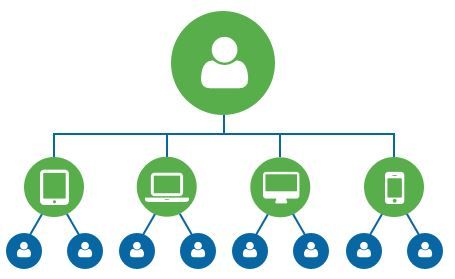
Accountability across all your devices {Accountable2You}
Our home is filled with devices.  iPads, iPods, cell phones, Kindles, and of course multiple computers for homeschooling.  Honestly until recently, we hadn’t really given much thought on putting safeguards into place for our children.  I was super excited when the chance came to review an internet accountable software.  We were given the wonderful opportunity of checking out Accountable2You, and were given access to the Family Plan.

About the Product:

Accountable2You is is an accountability software that you can use on multiple devices with a membership.  Basically it tracks the activity and will alert you when something fishy is triggered, whether in an internet search or even in a text message.  The program can be set up to have someone be the accountability partner and receive an instant text or email when there is questionable activity.  This program cannot be disabled unless you know the password and will instantly trigger an alert as well if it’s attempted.

It’s important to note that this is just an accountability program and NOT a web filter.  The website recommends other programs for filtering.

More than just accountability on devices, it can also be set up to alert if someone is on a device after a certain time.  This is perfect for kids that may try and sneak their device after it’s supposed to be put up for the night.Accountability across all your devices {Accountable2You}

With the program, there are 4 plans to select from:

Individual Plan:  The individual plan is made for one person.  This is perfect for singles and can monitor up to 6 devices.

Family Plan:  The family plan can monitor up to 20 devices!  This even works for your kids that are away at College.

Group Plan:  In the group plan, each user in the plan can have up to 6 devices.  This is perfect for church groups or other groups that want to make sure they are accountable to someone.  Member accounts have all the features of an Individual account, including reporting, accountability partners, and alerts.

Small Business Plan: The Small Business Plan is designed for businesses wanting to monitor activity on devices used within their organization.  The administrator of the plan can set up unlimited devices, such as employee computers or tablets, and see all activity for all devices installed under their account.


My Thoughts:

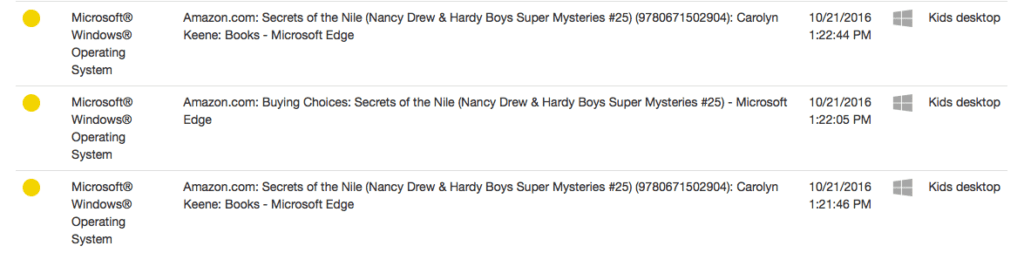
This has actually been quite an interesting review!  Since using Accountable2You, it’s opened up great discussions with our kids on what is appropriate internet usage and such.  Thankfully we haven’t had any major alerts, but I’m so glad that we have this added for extra accountability.  We did have a couple yellow alerts.  My daughter was searching “cute shirts for girls” on Amazon and since it had the word cute and girls in the same search, it alerted me.  Even though it was an innocent search, it was good to know that the program was working and that it yellow flagged a questionable search so that I knew to go review that item.  We also had it triggered with some books that my kids were looking at.  It will tell you the exact time and device that triggered the alert.

screen-shot-2016-10-31-at-3-36-28-pm

I found the program really easy to install on every device except on the iPad and iPhone.  Android was super easy.  With Apple devices, you have to disable safari and use the Accountable2You app to access the internet in order for it to track.  With Android, I just had to install the app and set it up.  It tracks texts on Android but not on Apple.  It took a few extra steps, but wasn’t too difficult.

My favorite part of the program is that it will still track if you go in the “incognito” mode if you don’t want your internet history followed.  That is a very important feature to have with kids.

I’m thankful that we have installed this on our devices and will definitely renew when it is time.

For More Information:

For more information, please visit the Accountable2You website.  You can also find more on Facebook and Youtube.

Please click the banner below to find more reviews on this product and others with the Homeschool Review Crew.


Accountability across all your devices {Accountable2You}
Crew Disclaimer

Review: MyFreezEasy Freezer Meal Plan

October 11, 2016 By MommyOctopus Leave a Comment
By clicking my links, I may earn a small commission to support this blog. Please see our Disclosure Policy.

With 5 kids in the house, homeschooling,  gymnastics, scouts, co-ops, and more, dinner can be quite hectic around here at times!  I have been checking out the MyFreezEasy.com Freezer Meal Plan Membership from MyFreezEasy as part of the Homeschool Review Crew.

About MyFreezEasy:

MyFreezEasy.com Freezer Meal Plan Membership {MyFreezEasy}
 

With a MyFreezEasy.com membership, you have access to 8 different meal plans every month filled with NEW recipes!

MyFreezEasy.com Freezer Meal Plan Membership {MyFreezEasy}

  • Traditional Plan – 10 meals: mix of different types of meals
  • Gluten-Free Plan – 10 meals: completely gluten-free including sides
  • Slow Cooker Plan – 10 meals: all freezer to slow cooker style
  • Clean Eats Plan – 10 meals: all “clean ingredients”
  • 20 Meals Plan – 20 meals: mix of different types of meals
  • All Chicken Plan – 10 meals: all recipes using chicken breasts/chicken thighs, so you can get the chicken on sale and stock your freezer
  • All Ground Beef Plan – 10 meals: all recipes using ground beef so you can get the ground beef on sale and stock your freezer
  • All Pork Chops Plan – 10 meals: all recipes using pork chops or pork tenderloin so you can get the pork on sale and stock your freezer

In addition to the meal plans, members also receive complete shopping lists, assembly details, printable labels, highlight videos, instructional assembly videos, and even adaptations for dairy and gluten free diets.

MyFreezEasy.com Freezer Meal Plan Membership {MyFreezEasy}

Our Experience:

MyFreezEasy.com has been my first experience with a freezer cooking meal plan.  I often make our meals doubled so I can freeze and extra pan of something, but hadn’t considered taking the time to make a big batch of meals to keep in the freezer.

MyFreezEasy.com Freezer Meal Plan Membership {MyFreezEasy}
Right off the bat, I was thrilled with the way you can choose recipes on the website.  With the membership we were given, I was able to select and remove meals that didn’t sound appealing to our family.  For September, I chose from the All Chicken Plan since we mostly eat chicken and chicken has been on sale here lately.  For the October plan, I chose the Slow Cooker Meal Plan.

We went with the following meals from September:

  • Bacon & Ranch Chicken
  • Basil Balsamic Chicken
  • Chicken Fajita Bake
  • Chicken Pineapple Curry
  • Slow Cooker Butter Chicken

October’s Slow Cooker Meal Plan featured these meals:

  • Slow Cooker Italian Chicken & Vegetables
  • Slow Cooker Red Pepper Chicken
  • Slow Cooker Island Chicken
  • Slow Cooker Simple Baby Beef Stew
  • Slow Cooker French Dip Sandwiches.

I really like that the shopping list is included and that with the premium membership, I can select to feed more than 4 people and receive the conversions for a larger group.  That comes in handy when you’re a family of 7 plus Grandma most nights.

img_3468

Chicken Fajita Bake – This was a hit with the family!

We enjoyed the meals that we tried, however I would have appreciated a little more flavor.  Since we have been mostly cooking from scratch over the past 6 years after finding out about my son’s allergy, I have learned how wonderful it is to pull from the spice cabinet instead of store-bought packets and mixes.

I agree with the concept and that the recipes are pretty simple.  Perfect for a busy family.  Having frozen meals ready to heat and serve comes in handy when you’re looking to minister to friends going through hard times as well.  You could simply pull out a meal to cook for them, or you could simply provide the frozen meal and instructions for them to cook when needed.  Definitely a wonderful service!


For More Information:

For more information, you can visit the MyFreezEasy website.  You can also find out more on their Facebook, Instagram, and Pinterest.

You can also read other’s reviews of MyFreezeEasy.com by clicking the banner below.

MyFreezEasy.com Freezer Meal Plan Membership {MyFreezEasy}
Crew Disclaimer

Apologia: Exploring Creation with Astronomy Review

September 6, 2016 By MommyOctopus Leave a Comment
By clicking my links, I may earn a small commission to support this blog. Please see our Disclosure Policy.

When I was planning this school year, I was trying to decide what we wanted to do for science.  When the opportunity came up for us to review Exploring Creation with Astronomy, 2nd Edition from Apologia Educational Ministries,  I was thrilled!  The kids have been asking to learn more about Astronomy and this gave us the perfect chance!


Apologia: Exploring Creation with Astronomy Review

About the Product:

Children can explore the galaxy using the new and revised Exploring Creation with Astronomy, 2nd Edition.  Packed full of hands-on activities to introduce elementary aged children to the Universe using a Biblical base.  Available for purchase is the Exploring Creation with Astronomy, 2nd Edition textbook, Notebooking Journal, Junior Notebooking Journal, Audio CD, and the Science Kit.

In the second edition textbook and notebooking journals, you will find:

• Biblical wisdom used throughout the textbook
• Infographics to help children see information in an understandable format
• 14 lessons updated with current scientific data
• Wisdom from Above and Think About This callout boxes which give special attention to God as Creator
• A new color-coordinated schedule for the textbook, notebooking journals, and lab kit
• Fresh layouts for activities found within the textbook
• All new full-color illustrations
• Space to journal each textbook and notebook activity

Our Thoughts:

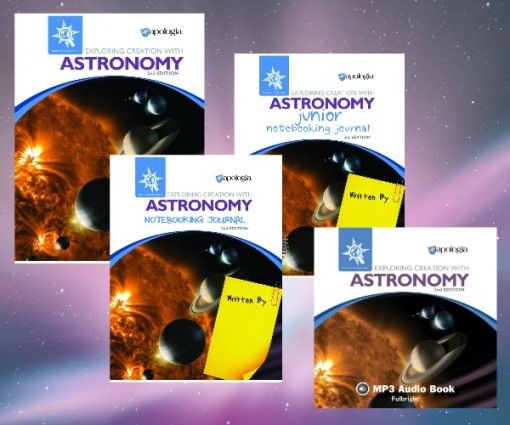
For review, we received the Exploring Creation with Astronomy, 2nd Edition textbook, a Notebooking Journal, Junior Notebooking Journal, and the Audio CD.

We have been using Exploring Creation with Astronomy, 2nd Edition for about 6 weeks now as part of our 2016-2017 homeschool adventures and we have been super pleased!

Apologia: Exploring Creation with Astronomy Review

Even though this product is geared toward elementary age students, I’ve been working on it with all 4 of my big kids, and just having my elementary schoolers do the notebooking journals. The notebooking journals have been a wonderful edition to the textbook and provide lots of hands-on activities, instruction, and experiments.  There are places to record observations from experiments or write down interesting facts that you would like to remember.  The Notebooking Journal is geared toward children ages 3rd-6th grade and the Junior Notebooking Journal is geared toward children ages K-3rd.  I believe they are right on track with the grade levels for the journals.  The Junior Notebooking Journal has fun coloring sheets intermixed with the projects and the Notebooking Journal has more writing opportunities.  Both can be done simultaneously if you have multiple students of different ages like I do.  In the journals, there is a schedule to help pace out your year and provide time for the experiments and the reading.  That has been very helpful for me as a parent to make sure we stay on track.

The kids eagerly look forward to science time during our homeschool day.  So far, we have learned about parts of the solar system, the planets, the sun, and have done some great projects like build a 3D solar system out of balloons!

Right in the textbook, you will find experiments and projects to help bring all the science knowledge to life right before your eyes. I also really appreciate how Apologia circles everything back to our Creator so we can see His hand in everything in the universe.  We are always very pleased with Apologia!

For More information:

For more information, you can visit Apologia’s website to check out these products.  You can also find Apologia on Facebook, Twitter, Pinterest, and Instagram.

You can also read more reviews from the Schoolhouse Review Crew on this product and others by clicking the banner below.

Exploring Creation with Astronomy, 2nd Edition Review
Crew Disclaimer

Timberdoodle: Uncle Sam and You Review

July 15, 2016 By MommyOctopus 1 Comment
By clicking my links, I may earn a small commission to support this blog. Please see our Disclosure Policy.

Screen Shot 2016-07-15 at 7.34.14 PM

Being an election year, I want my kids to have a better understanding of our government.  As you may have noticed on our Homeschool 2016-20-17 plans, we intend on using Uncle Sam and You curriculum for social studies with our older children.

Our friends at Timberdoodle have sent us this Notgrass curriculum set and we looked forward to writing this  Uncle Sam and You review.

About This Product:

This Notgrass Company kit includes:

  • Uncle Sam and You Part 1, 75 lessons.
  • Uncle Sam and You Part 2, 75 lessons.
  • The Citizen’s Handbook
  • Uncle Sam and You Answer Key

Between all of the books, you have a full year of learning about civics and government.  This program is geared for children in 5th-8th grade, but can be used with guidance for younger students.  Lessons focus on America’s founding documents, branches of government, patriotic symbols, voting, the election process, Washington, D.C., the presidency, how Congress works, American holidays, and aspects of federal, state, and local government.

Each text includes 15 units, and 4 lessons per unit.  Perfect for 4 day a week learning.  Each full-color lesson includes a short chapter to read that explains the topic to the student; chapters feature both modern and historical photographs and illustrations. Lessons conclude with a variety of subject-based activity ideas that relate to Biblical studies, literature, creative writing, art, vocabulary, reading assignments, and notes for the sold-separately (and optional) student workbook/lesson review. A weekly family activity that involves crafts, meals, and other multi-age activities is also provided.

My Thoughts:

At first, I was overwhelmed and didn’t quite know where to start!  Where was the teacher’s manual to show me what to do?  I opened Uncle Sam and You Part 1 and the instructions are right there for teachers and/or students.  I really appreciate not having to keep up with an extra manual and having the simple instructions right with the text.  This way, children can work independently, or you could work together as a family.  We are choosing to work through it together.

I like that it suggests additional reading materials and lets you know exactly when you will need them throughout the lessons if you so choose to add them in.  It’s enough material without being too overwhelming and can usually be completed within about 30-45 minutes.

This is our first experience with a Notgrass curriculum and we are very pleased.  We will be checking out more of their items through Timberdoodle in years to come.

For More Information:

The Notgrass Uncle Sam and You curriculum set is another outstanding component of Timberdoodle’s 2016 Sixth-Grade Curriculum Kit!  You can also get the optional Lesson Review or Student Workbook .

Review: Easy Grammar

June 9, 2016 By MommyOctopus Leave a Comment
By clicking my links, I may earn a small commission to support this blog. Please see our Disclosure Policy.

Screen Shot 2016-06-09 at 4.20.02 PM

Easy Grammar is a curriculum item that we have used during the past 2 homeschool years.   Sometimes in homeschooling, grammar seems to get a little lost.  I admit that we didn’t really start working on it much in the early elementary years with our oldest 2 kids, but thanks to Easy Grammar, it’s in full swing now.

Timberdoodle.com offers Easy Grammar Teacher’s Guide, Workbook, and Test Booklets at an affordable price.  If you weren’t sure what to get, you could start with the Easy Grammar Teacher’s Guide.  The Teacher’s Guides have the answers and tips for teaching, but also include blank workbook pages so that you can make copies for your family.

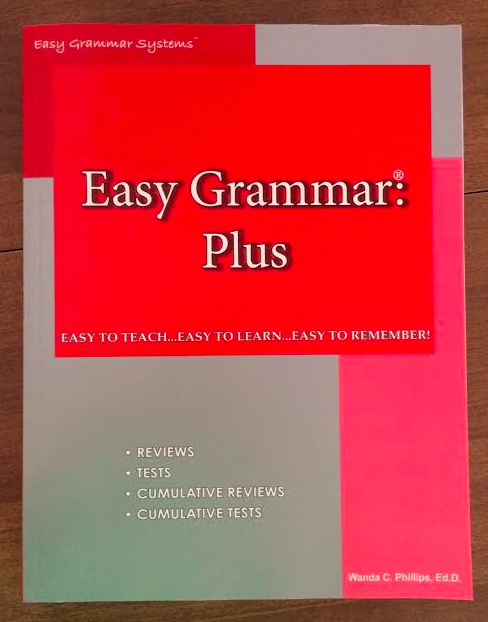
Timberdoodle.com sent me Easy Grammar Plus, which is the next one we need for my oldest homeschooler.   The Easy Grammar Plus isn’t geared toward a specific grade, but will work well for grades 7 through adult!  Yes, adult!

Easy Grammar Plus contains additional higher level concepts such as gerunds plus the perfect and progressive tenses.  It also includes more difficult capitalization and punctuation rules.  All in this one book, you will find unit reviews, unit tests, cumulative reviews, and cumulative tests.  Of course my favorite part is the reproducible worksheets.  Being a large family, being able to make copies of lessons saves me a ton of money.

We highly recommend Easy Grammar.  I’ve seen huge improvements in my children’s writing and they understand more about grammar from using this book.  We will be continuing to use it throughout their levels.

Thank you to Timberdoodle for providing us with a copy in exchange for a review.  


Review: SchoolhouseTeachers.com

January 7, 2016 By MommyOctopus Leave a Comment
By clicking my links, I may earn a small commission to support this blog. Please see our Disclosure Policy.


For the past few weeks, my children and I have been reviewing the Yearly Membership at SchoolhouseTeachers.com.  SchoolhouseTeachers.com is an excellent resource for homeschooling families with over 200 courses from preschool through grade 12.  With the low monthly fee, you get access to all of the courses for your entire family, no matter the size!  Perfect for our large(r) family!

Screen Shot 2016-01-07 at 10.33.42 AM

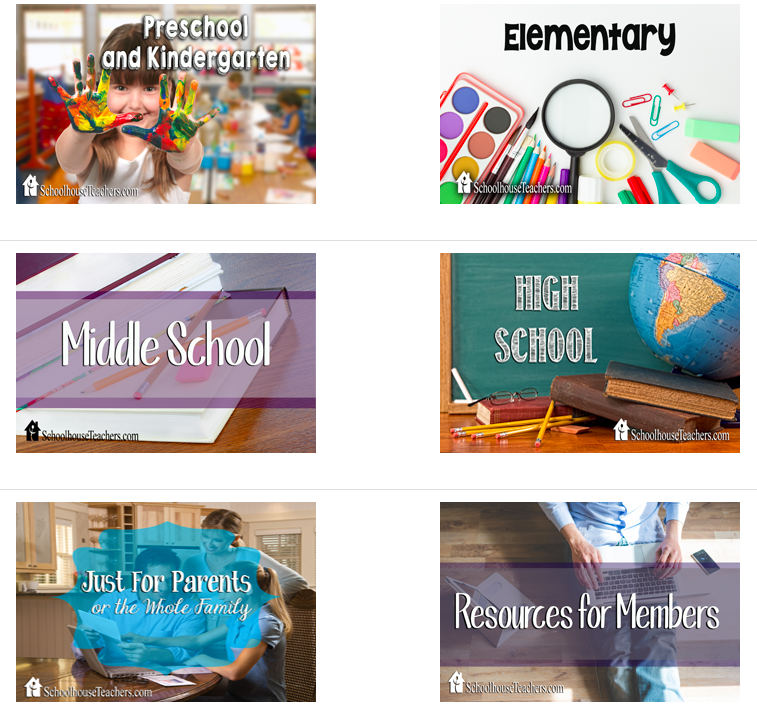
Once you are logged in to SchoolhouseTeachers.com, the best place to start on the site for a new member is the New Members Hub.  From there you will be brought to a page where you can start looking for courses.  The courses are divided up into Preschool/Kindergarten, Elementary, Middle, and High School.  Click on the category that you are looking for and then you’ll have an abundance of courses to choose from!  One you decide which courses to take, just click and you’re there!

Screen Shot 2016-01-07 at 10.37.22 AM

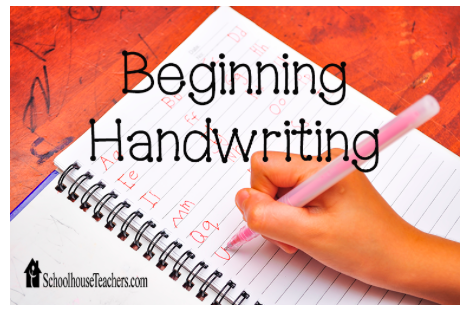
Once I was logged in, I was overwhelmed at all the classes that were available!  So many choices and so little time!  I narrowed it down by choosing which child I wanted to find a course for first.  I went with my preschooler.  I decided to use the Beginning Handwriting course with my almost 5 year old daughter since she’s been wanting to do more school with the “big kids”.  This was the perfect way to ease into it without buying lots of extra workbooks.  Everything was clickable and easy from there.  The lesson plans come with an introduction to the course and show you exactly what to print and even tips on how to teach.  I loved seeing all the helpful hints and having everything accessible at the simple click of a button.  In this particular course, each lesson is work for about a week.  The activities combined fun and learning all together to make it exciting for my daughter.

Screen Shot 2016-01-07 at 11.01.47 AM

After we got her settled, I decided to go to my oldest and check out the middle school lessons!  Holy smokes!  They offer classes for Art, Bible, Computer and Technology, Drama and Speech, Electives, Foreign Languages, History, Geography, Social Studies, Language Arts, Math, Music, Nutrition, Health, Fitness, and Science!  We ended up deciding on Math since she could use a little extra encouragement in that subject.  More specifically, we went with Pre-Algebra.  We actually skipped ahead to what she is currently working on in her math book, which is percents.  It had simple explanations that we easy to understand and some problems to work on.  It was a great supplement to our current curriculum.  In this case, I don’t think I would use this particular course as a stand alone, but am definitely going to use it as a supplement.

My final thoughts is that SchoolhouseTeachers.com is an excellent program to supplement homeschooling.  Although it may be hard to narrow down your selections on courses, the fact that there are so many to choose from make it a fantastic resource.

I am now a member of the Schoolhouse Review Crew and as such I’ll be brining you more homeschool information and reviews over the next year!  I think many of you will really enjoy this addition to MommyOctopus.com.

SchoolhouseTeachers.com

Since I’m a crew member, I have an exclusive code for you guys!  New members can use code CREWFOLLOWER on SchoolhouseTeachers.com through 1/31/2016 to save 50% off a year’s membership!  That’s quite the deal!  A year membership is $139, so only $69.50 after the code!  For more information, head on over to SchoolhouseTeachers.com and check it out!

SchoolhouseTeachers.com Review 2016
Crew Disclaimer

Making Our Budget Work

May 12, 2015 By MommyOctopus Leave a Comment
By clicking my links, I may earn a small commission to support this blog. Please see our Disclosure Policy.

In my circle of friends, we have been talking about budgets, making ends meet, and how the heck to try and get a little ahead in the world.  I admit, it’s really hard, but it’s doable.  No matter what your income, the key is to not spend more than you make.  If you do, you are digging yourself a hole that is impossible to get out.  We like to plan for things ahead of time so we are prepared when the car breaks, when insurance comes due, when we want to take a vacation.  You can’t always predict a rainy day, but you know that they will eventually arrive and you will want to be prepared.

Every time my husband gets paid, which is every 2 weeks, we sit down together as a couple and figure out where we are telling the money to go.  That’s right, we tell our money where to go.

Off the top, we take care of our essential bills – house payment, water, electricity, etc.   Since are paid every other week, we estimate and divide our bills by 2 so we know how much to budget each paycheck.

Then comes more budgeting.  Write down every single category that you can think of for your family for the entire year.  We have the following categories:

  • Tithe
  • Savings
  • Groceries
  • Gas
  • Pets
  • Dining Out/Entertainment
  • Home Maintenance
  • Gifts
  • Erin Allowance
  • Chris Allowance
  • Clothing
  • Christmas
  • Homeschool Materials
  • Insurance
  • Car Maintenance
  • Vacation
  • Other

After we have paid our bills, we allocate the rest of the money into each category.  For starters, we tithe to our church and also put 10% into savings.

You’ll notice we budget for things like Christmas, Insurance, Homeschool Materials, Vacation, Clothing, and Gifts.  These are all things that will happen throughout the year.  Every year Christmas arrives.  Every year a new school year arrives with homeschool materials needed.  Kids outgrow their clothes.  Car Maintenance is an essential. Insurance has to be paid.  Vacation may or may not happen.  We adjust our budget according to our plans that year.

I remember there was a time when I’d get an insurance bill and panic.  Where were we going to get the money to pay that rotten bill?!?!  After time, I realized, it’s not the bill’s fault, it was my poor planning.  I know it’s coming, so I might as well plan all year round so when it comes it doesn’t sting so much.

This doesn’t come easy, though.  It’s really hard to be sticking the money away for these things and taken an initial food budget or entertainment fund cut.  However, when the time rolls around and you have the money ready, you’ll be so thankful to not be eating only beans and rice and ramen noodles that month. 😉

Continue on down the list placing funds as needed.  Have a party coming up?  Up your food budget and take a cut elsewhere.  Lots of birthdays that month?  Up your gifting and lower something else.

Allow your categories to “roll-over” to the next pay period so you can continue saving.  For example, you know you need a new door in your house.  The $20 you can budget this paycheck isn’t going to make it.  Don’t give up.  The next month, add $20 more to that and now you have $40.  Continue building until you have what you need.  It’s not going to happen overnight but will happen.  This is another reason to continue putting the money in their categories.  Say you haven’t been using your car maintenance category for over a year.  You have $750 in car maintenance saved up.  Then something major breaks in your car.  It’s a whole lot easier to move forward when you know you may have most of it already saved up and waiting on that rainy day.

Now let’s talk about allowances.  No, I’m not talking about the kids, I’m talking about the adults.  My husband and I sit down and plan our budget every time and what we have decided together is that each paycheck we get an allowance.  We have decided on $20 per paycheck.  He gets $20 and I get $20.  We don’t ask each other where the money went, that is up to our discretion.  $20 pays for my mom’s night out with friends, haircuts, etc.  Many months I don’t even use my money and save it up for something special for myself.  Chris’ $20 pays for his breakfast with friends every other week, and more recently, he saved up his money and bought me some beautiful earrings for Mother’s Day!  $20 seems to work for us, and like I mentioned, many weeks we still have it to roll-over to the next month.

My top 5 tips for a successful budget:

  1. Prepare for the rainy day BEFORE it arrives.
  2. If you are married, work on the budget TOGETHER.
  3. Learn to say NO, it’s not in the budget.
  4. Be a good STEWARD of what you do have.
  5. Do not SPEND more than what you make.

What other tips would you add that have worked for your family?


  • « Previous Page
  • 1
  • 2
  • 3
  • 4

Catch up with Mommy Octopus

Follow Me on Pinterest

Subscribe

Enter your email address:

Delivered by FeedBurner

Categories

Grab My Button


Privacy Policy | Disclosure

Copyright © 2026 · Modern Blogger Pro On Genesis Framework · WordPress · Log in

We are using cookies to give you the best experience on our website.

You can find out more about which cookies we are using or switch them off in .

Mommy Octopus
Powered by  GDPR Cookie Compliance
Privacy Overview

This website uses cookies so that we can provide you with the best user experience possible. Cookie information is stored in your browser and performs functions such as recognising you when you return to our website and helping our team to understand which sections of the website you find most interesting and useful.

Strictly Necessary Cookies

Strictly Necessary Cookie should be enabled at all times so that we can save your preferences for cookie settings.